The best tripod head for waterfall photography is….

…not a fluid video head.  I found that out the hard way.  They work great for static HORIZONTAL shots, but they lack the slot on ballheads that rotates the camera to a vertical orientation.  My Manfrotto 055x ProB does provide a workaround, because the extending center column can tilt the mounted camera by 90 degrees.  Next time I’m going to just bring the correct ballhead with me.

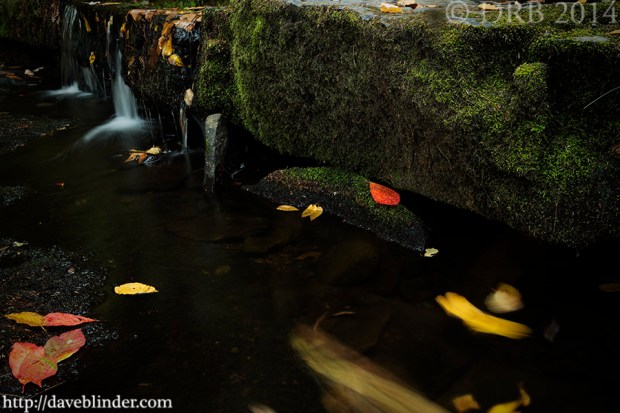
NJ waterfalls picture

Waterfall photo taken in Morris County New Jersey. The equipment utilized was the Tamron 14-150mm Di II all-in-one lens and the Olympus PEN E-PL3 Micro Four Thirds Camera.

Above photo taken with the Tamron 14-150mm Di III Lens, the Olympus PEN E-PL3 M4/3 Camera, and a Manfrotto tripod.  A 52mm circular polarized was mounted onto the lens to lower reflections and increase exposure time.  Camera settings: 14mm (28mm full frame equivalent), 0.6s F/10 ISO 200 in Manual Exposure Mode.  Auto White Balance, Stabilization off, 2-second Delay, and Single Point focus near the Maple leaf.

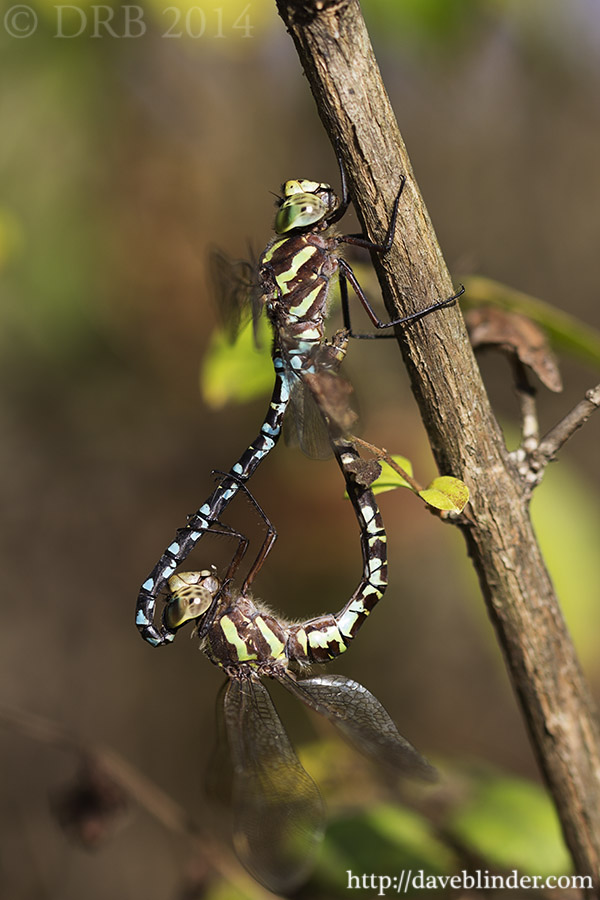
Rethink the most obvious shooting angle: Green-striped Darners

Photos taken yesterday in Sussex County, New Jersey.  I was actually trying to take a macro shot of a caterpillar in the shade (quite frustrating) when I saw these two large dragonflies in the mating wheel position fly near me and land.  I approached slowly with macro lens in hand and got very lucky that they were not startled off.  Haven photographed insects quite a bit the past few years, it’s only natural to look to capture them both together in the same frame without having any of their appendages extend beyond the frame.

Shot #1:

macro odonata photo

A few of a male and female darner in a typical reproductive pose. Photo taken in Sussex County, New Jersey with the Tamron SP 90mm VC F/2.8 Macro Lens and the Canon EOS 60D DSLR.

Metadata: 90mm, 1/640th F/3.2 ISO 100, handheld with VC.  Manual Exposure.

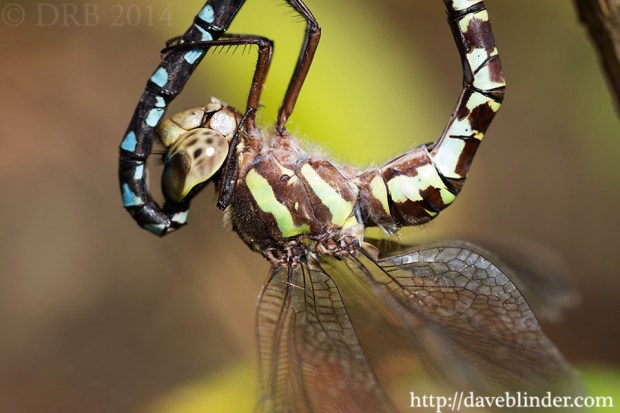
I NEARLY walked away haven taken a pretty sharp frame, but I thought “what the heck” why not try a true macro photo with high magnification on one dragon’s face.  It took 1 or dozen frames to get a handheld shot in focus at that magnification, but to me it created a photo with a much higher “wow” factor.

Photo #2:

macro odonata face photo

An intimate view of a Green-striped Darner showcasing vivid lateral coloration. Photographed with the Tamron SP 90mm VC Macro Lens + Canon EOS 60D in NJ.

Metadata: 90mm, 1/100 F/5.0 ISO 100, handheld with VC.  Manual Exposure.

It is certainly subjective to which shot is “better”, but the 2nd is more to my liking.  By rethinking about possible compositions I have 2 drastically different photos of the same subject taken a minute or two apart.  Quality nature photography is seldom performed in a hurry.  I have always been an advocate of the phrase “haste makes waste”.

Optimizing Photo Contrast for the Web: Creek and Fallen Leaves

In my fairly early years of photography, I got caught with the ETTR bug.  Is that a fatal virus?  Nope.  ETTR is an acronym which stands for Expose To The Right.  This ideology is based on the idea that a bright exposure with a histogram pushed as for towards the right (brightness side of histo) is the path to maximum image quality in long run. When exposing to the right, a user wants to make sure the highlights are not clipped or blown out of gamut.  Lost highlights can’t be recovered much, there are no x’s and o’s on your memory card for your camera or computer to look at.  On the flip side, having a slight overexposure of your shadow areas DOES bring in extra information in the pixels.

RAW PhotoShop workflow

A side-by-side comparison of my post-processed file versus the SOOC shot.

The above illustration hopefully shows how I “season to taste” on a landscape photo that I took yesterday.  Setting the black level and white level can be a matter of personal preference, there are no hard-set rules.  I like my pictures to tell a believable tale by retaining the integrity of the scene but I also want plenty of contrast so that my upload or print will “pop”.  For this particular photo I used the Curves tool to bring the dark areas from a medium tonality to a darker tonality.  This provides greater separation between the highlights, midtones, and shadows.  I’ve also added a slight vignette which helped to “burn in” some bright corners from the original photo.

NJ Landscape Photographer

Optimized image, originally exposed to the right. Taken with my Tamron 18-270mm VC Lens and my Canon EOS M 18.0 MP Compact Systems Camera. Manfrotto tripod used for stability and a 3-stop Neutral Density filter was used to lengthen exposure time.

Finalized photo is above.  A landscape nature frame taken in Pennsylvania.  The equipment used includes a Tamron 18-270mm VC Lens, a Canon EOS M Camera, a 3-stop Neutral Density Filter, and a Manfrotto Tripod.  Metadata: 2.5s F/13 ISO 100, 27mm in Manual Mode.

Selective Sharpening in Nature Photography: American Black Bear

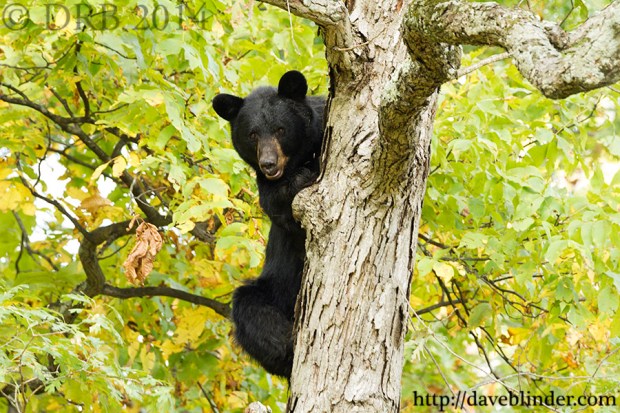
My typical nature photo post-processing workflow is very short and sweet unless I have to remove sensor dust spots from shoot at a vary small aperture.  I do like to present my images as realistically and un-manipulated as possible.  My still image format is always camera RAW to get the best possible dynamic range and so that I can make my own decisions over noise reduction and sharpening.  I had the great fortune of finding a wild Black Bear descending a tree in Northern New Jersey today.

Here is my finalized and optimized image with my typical watermarks and downsized at 900px as I generally do for web usage:
ursus american

A wild Black Bear descending a tree in North NJ. Photographed with the Tamron SP 150-600mm VC, the Canon EOS 7D, and a Manfrotto tripod.

Taken with a tripod-mounted Tamron SP 150-600mm VC Lens and Canon EOS 7D.  I had no time to prepare for the shot or change my camera settings.  I had previously dialed in ISO 800 F/8.0 +2/3 Exposure Compensation in Aperture Priority Mode, so the shutter speed was to be determined by my camera’s meter.  In this particular shot my 7D did a good job of gauging the brightness and I was left with a shutter speed of 1/80th of a second and a good exposure.  In the world of wildlife though, this is a relatively slow setting and prime for blur of subject movement.

Below are 100% crops to reveal what is really going on behind the scenes in my “digital darkroom”

RAW versus JPEG

On the right is a very unflattering view of my unprocessed RAW at high magnification and on the left is a slightly more flattering view of my output JPEG at the same magnification.

As you can see the eye and fur definition is lacking on the SOOC file on the right.  The Tamron SP 150-600mm VC is very sharp near the 400mm focal length and at apertures like F/8.  Unfortunately AI Servo focus is often less accurate than One-Shot focus.  Other reasons for image softness may include: very slight subject movement, auto-focus sensor slightly off the bear’s eye, shooting in the shade (low contrast on subject), and perhaps the panning movement on my tripod head.

After my initial default global sharpening of the RAW file, I applied an additional low-intensity High-Pass Sharpening layer.  I still was not happy with the definition on the bear’s face.  I created an additional layer of global High-Pass sharpening, but this time I erased the effect off of the background to prevent introduction of widespread digital noise.  I also feathered the remaining sharpening a bit, by tracing the bear’s outline with an eraser tool set to 50% to maintain a natural transition from subject to foreground.  This is one method of performing selective sharpening to optimize images and get the best out of your photos.

Happy to answer any questions about my workflow if you leave them in the comments.

Free how-to nature photography ebook now available for download.

My 13 page ebook, Nature Photography in 20 Frames, is now available in its entirety.  20 photographs covering my approach to Wildlife, Macro, and Landscape shooting with DSLR cameras and interchangeable lenses.  I have 3 download mirrors sites available, and please let me know if you have any trouble obtaining the book.  I will email you the PDF directly if the links don’t work.

Nature Photography in 20 Frames

My free short but detailed PDF ebook on Wildlife, Macro, and Landscape Photography. Get your $5 PayPal donation ready… but only if you feel like paying for it 🙂 This link will re-direct you to my main website.

Question, feedback, and typo corrections are appreciated too!

Thanks,

Dave

Exposing for backlit photography subjects: Orange Sulphur

I am generally a fan of semi-automatic exposure systems when looking to photograph wildlife.  Specifically, I begin most outings with the camera in Aperture Priority Mode, and having an extra 2/3 stops of lights dialed seems to work pretty often.  However, as soon as I see a tricky lighting situation through my viewfinder I will try to get into Manual Exposure Mode as quickly as possible.

NJ Wildlife Photo

A macro photograph of an Orange Sulphur butterfly in New Jersey. This backlit capture was made using the Tamron SP 90mm VC 1:1 macro lens and the Canon EOS 60D DSLR.

Camera settings: 1/200th F/5.6 ISO 200

Above photo is a handheld capture with one of my typical rigs for closeup photography, the Tamron SP 90mm VC lens and the Canon EOS 60D.  The goal with this backlit photo was to get a good amount of illumination showing on the butterfly itself.  To achieve this, some of the brightest parts of the scene are pushed out of gamut because of the dynamic range restrictions of DSLRs.  As cameras are programmed to expose for the median tonal range of an image, it would require a significant increase in exposure compensation to get what I was after.  Turning the knob to Manual Mode and dialing in my desired settings was a much more succinct process.

“Blowing out the highlights” is not always a sin in my book, as I’ve learned to “see how a camera sees” and envision the end product.  Indeed there is some detail loss on the fringes of the butterfly and also on the petals of the flower, but in this case I think that adds to the “warm” feel of the image.

New Jersey Fine Art Nature Photo: Dusk at the Jersey Shore

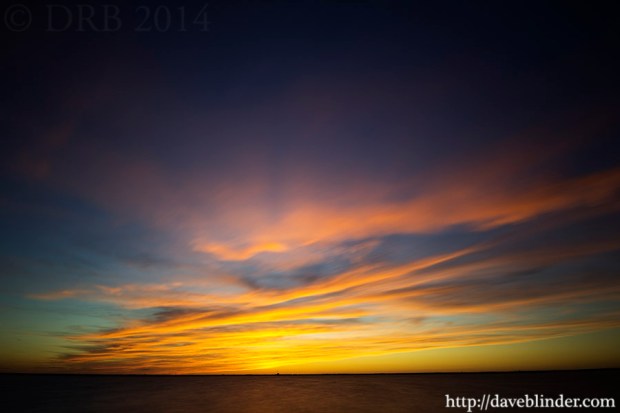
This is a recent DSLR image made in Ocean County, New Jersey.  I had seen examples of long exposure photography that exhibited substantial cloud blurring but I hadn’t pulled many off before this.  I still would like to increase the length of this type of shot to minimize shape definition but that will require use of Bulb Mode on the camera and even less light hitting the sensor.

NJ Fine Art Photo

A long exposure DSLR photo facing westward a couple of minutes after sunset. Some low cloud formations briefly reflected vibrant pink and orange hues. Nature photograph taken in New Jersey using the Tamron SP 10-24mm Di II Lens + Canon EOS 50D.

Above photo was taken with the tripod mounted Canon EOS 50D camera and the Tamron SP 10-24mm Di II LD lens.  A Hoya 77mm HDx400 HMC filter is screwed onto my lens thread.  This 9-stop Neutral Density filter greatly lowers the amount of light that reaches the camera’s sensor.  Exposure time is 30 seconds at F/10 ISO 100.  Mirror Lock-Up and Camera Timer were also set on the camera to reduce loss of sharpness from vibration of the camera’s mirror or from my hand pressing the shutter button.

DSLR Nature Cinematography: Snowy Egret

I recently shot a few very short HD DSLR Video clips of one of the more common and easily recognizable wading birds in New Jersey, a Snowy Egret.  My personal goal for wildlife still photography had as been 2 archival quality captures of any subject that I found interesting.  Archival quality captures to me means focus is spot-on, exposure will not require significant post-processing, and the composition is pleasing to my eyes.  I also try to avoid repetition in my photos.  I’ve “upped the ante” on my nature shooting goals, and will now also try to film 1 or 2 quick sequences when I am in the outdoors.

Back to the point, I had been shooting all of my recent photos with a ballhead on my tripod.  Having no experience with fluid tripod heads, but realizing their importance in the video industry I started doing some research.  I already have Manfrotto RC2 quick release plates attached to most of my cameras and lenses so I wanted a fluid head that was designed for the RC2 plate.  I wound up purchasing a Manfrotto 128RC Micro Fluid Head and it has remained atop my 055x ProB tripod ever since.  This allows me to perform the steady panning motions needed for dynamic video work.

The above video was filmed using the Tamron SP 150-600mm VC Lens and the Canon EOS 7D.  Manual video mode settings include: ISO 100 F/14 and the Shutter Speed set to 1/80th.  I muted original audio from the clips in post-processing because of the loud hissing of the wind.  Guitar playing is me strumming my Washburn D10 Guitar, and I ended up recording this with my Samsung cellular phone.  Audio post-processing involved noise reduction, addition of a Phaser Effect, and overall Volume Reduction.  Video post-processing included trimming video segments, cross-fade transitions between shots, contrast enhancements, and split-tone color processing.

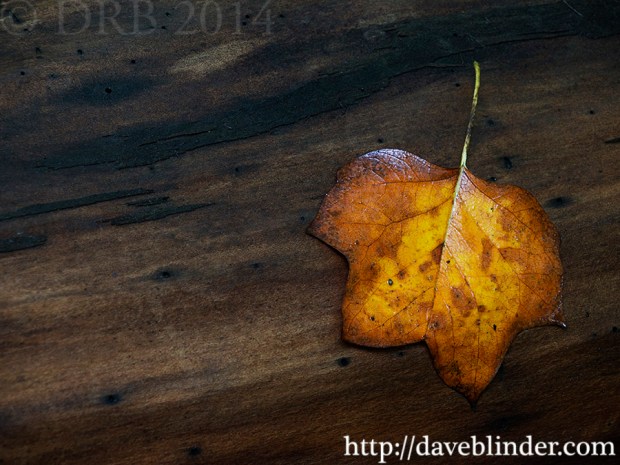
Poplar Leaf on Log

I get very caught up in trying to photograph the wildlife of New Jersey during our summer months.  However, now that the songbirds begin their southern migration out of the Mid-Atlantic and as many insects end their terrestrial lifecycles it is once again time to notice the various and vivid foliage colors brought about by the change of the season.

m43 NJ nature photo

An early Autumn nature photograph from New Jersey using Tamron’s all-in-one lens and an Olympus PEN compact camera.

Above photo was taken with Tamron’s first lens offering for compact Micro Four Thirds digital cameras.  The 14-150mm Di III provides a 28-300mm equivalency (35mm terms).  On the wide end, 28mm is great for drawing in scenery and the telephoto end with a short minimum focusing distance is very useful for honing in on details like individual leaves.  This photo of a Poplar Leaf in New Jersey was taken at focal length of 132mm in Aperture Priority Mode.  -1 stops of light was dialed in, with an aperture of F/9 and the ISO at 200.  My tripod-mounted Olympus PEN E-PL3 was triggered by a 2 second timer to allow for a 1/2 second exposure in this low-light situation.

Nature Photography in 20 Frames; my free how-to ebook on DSLR photography

Nature Photography in 20 Frames

Cover for my free short but detailed PDF ebook on Wildlife, Macro, and Landscape Photography. Get your $5 PayPal donation ready… but only if you feel like paying for it 🙂

Press release for upcoming eBook:

Nature Photography in 20 Frames
By Dave Blinder

I’ve completed the content for my first eBook which will be offered in its entirety as a free download, no strings attached, no trojan viruses, etc.  My short illustrated PDF is currently undergoing quality checks and proofreading.  I will provide download locations as soon as possible.  If anyone finds value in the book, I would greatly appreciate a $5 PayPal donation (info included in book) as I have done this work at my own expense.

Within the book I have provided full DSLR settings for each photo shown as well as a grid overlay to demonstrate the composition.  A focus point is also superimposed on each shot to show where critical focus was set.  The nature photos in my book encompass my personal approach to shooting Macro subjects, Landscapes, Birds, and Other Wildlife.

My PDF eBook will be completely free for non-commercial usage and distribution, but may not be altered in any way.  I will offer the eBook via email, my personal website, and try to have it uploaded to popular file sharing services as well.  I will be available to conduct private and public seminars to expand on the subject matter to support my material.

If you’d like personal notification upon release of my eBook send me an email – daveblinder@yahoo.com

Thanks very much,
Dave Blinder
Denville, New Jersey

https://daveblinder.wordpress.com
http://flickr.com/davidraymond