Florida Nature Travel Photography: Brown Water Snake

Many nature photographers head to Florida to photograph birds because they are abundant, cooperative, and colorful.  Some head down to shoot landscape images of the great wilderness areas.  Probably more than a few go just to eat Key Lime Pine.  Others go for the snakes.

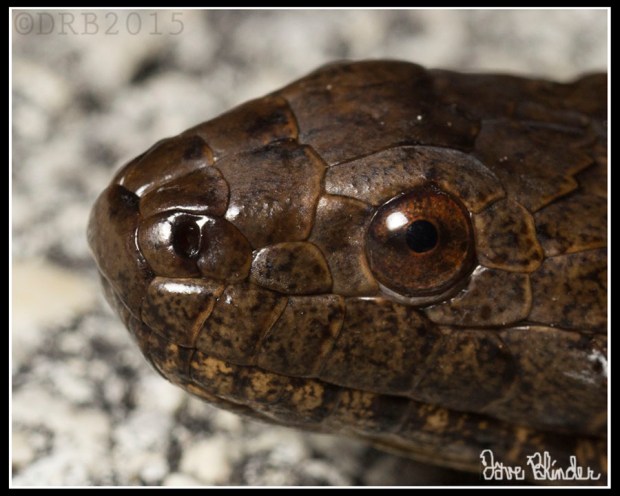
Below is one of the Snakes I saw on this trip, a Brown Water Snake.  This stocky serpent has a head shape that looks a bit look a dangerous viper, but there is no venom to be found in this species.

FLA Wildlife Pic

A Brown Water Snake absorbs some of the remaining heat from the road, shortly after sunset. #Photo taken handheld with the #Tamron SP 90mm VC macro lens, the #Canon T5 DSLR, and a 270EX II Speedlite with homemade flash diffuser.

FLA Water Snake Crop

A magnified view of the eye and face of a Brown Water #Snake in #Florida. Photo taken with the #Tamron SP 90mm VC macro lens.

Florida Nature Travel Photography: Scrub Jay

Last night I arrived home from a week of Florida nature photography. 3000+ Raw files to weed through, I expect to share less than 20% of them as always due to quality control and redundancy.

Anyway, here’s a nice shot of the endemic Florida Scrub Jay, first time I’ve ever seen one.  They can be approachable, so the quality of photo depends mainly on the angle of sunlight and subject isolation.  Below is my finalized web jpeg of the capture and also a detail crop.  Photo was taken with the Tamron SP 150-600mm VC lens, the Canon EOS 60D DSLR, and my Benro carbon fiber tripod.

Florida Bird Photo

One of the most famous #songbird residents of Florida, many people go to parks just to observe these vivid and active Jays. #Photo taken with the #Tamron SP 150-600mm VC lens and the #Canon EOS 60D

Exposure settings: 1/250 F/8 ISO 400, 500mm

bird photo detail

A tighter view of my original frame, nice #feather and eye #detail from the #Tamron SP 150-600mm VC lens.

New Jersey Art Photography: Tree Trunks in Snow

We had an amazingly picturesque snowfall yesterday here in Northern New Jersey.  While I did get wrapped up video editing in the morning, I made sure to leave myself a window of time to get outside to see what I could see through my viewfinder.  I had it in mind to shoot some creative art photos, not necessarily using straightforward methodologies.  Below is my favorite photo from yesterday, it was made by using a slow exposure speed coupled with a slight vertical panning motion of my hands.  The only change I made in post-processing was increasing the black point, to add some contrast back to the tree trunks.

NJ Fine Art Photo

Snow flakes blur against the browns of tree trunks while a blanket of white rests below. #Art photo taken in #NewJersey using the #Tamron 16-300mm VC All-In-One lens and the Canon EOS 50D DSLR.

Using my Tamron 16-300mm VC All-In-One lens and a Canon EOS 50D DSLR, my exposure settings were: 0.8s F/10 ISO 100, 41mm

New Jersey Art Photography: In-camera Double Exposures

The past few days I’ve been immersing my creativity in executing in-camera double exposures to capture “scenes within a scenes” with the intention of introducing the element of mystery to my nature photography.  I often find myself shooting each composition no less than ten individual frames, and after that I will see if a slightly different composition works better.  My goals for each photo are to have a good balance of detail, but also a compelling tonal range, and a balance of negative and positive space.  Post-processing is minimal.  Contrast seasoned to taste, perhaps a slight white balance shift (coming from Auto White Balance), and very soft-handed sharpening/noise reduction.

Both below images were taken with the mirrorless Canon EOS M digital camera and the Tamron 16-300mm VC All-In-One lens.

New Jersey Art Photography

Single image capture of a rusty metal footbridge and a quick zoom outward to reveal the trail to the footbridge.

Exposure settings: 25s F/16 ISO 100

NJ Photographic Art

Singe image capture of reflected trees with a quick zoom outward to reveal a broader view of the stream.

Exposure settings: 15s F/8.0 ISO 100

Fall bird photography: Savannah Sparrow

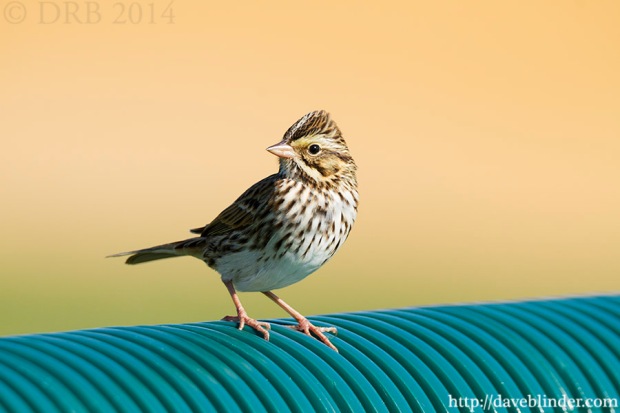
With the days in New Jersey growing gradually colder and shorter, I am always a bit remorseful to see the dwindling of the vibrant insects that I like to photograph.  Other wildlife like Reptiles and Amphibians also become less active.  However, the cooler airs bring visiting songbirds that seldom or never breed in our Mid-Atlantic region.  The Savannah Sparrow is a grassland bird with very fragmented breeding habitat in NJ, but the birds that bred further North now visit in search of food.

Passerculus sandwichensis

A migrant Sparrow pauses very briefly in New Jersey atop the fence of a local ball field. Photo taken handheld with the Tamron SP 150-600mm VC Lens and the Canon EOS 7D.

Above photo of a Savannah Sparrow was taken handheld with the Tamron SP 150-600mm VC Lens and the Canon EOS 7D.  A manual exposure of 1/500th F/8 ISO 400 was set, and I believe this is the only frame where I captured a good head angle before the small bird flew off.

Shadow Darner in Autumn

This another “right place, right time” photo, one of my favorite kinds of photography.  There was a light rain when I went out to shoot so I had the mindset to do long exposures of running water (which I did).  I did a brief walk around a pond before heading home and barely noticed this Shadow Darner dragonfly at rest against brilliant fall foliage.

Fall leaves and dragonfly in NJ

A dragonfly at rest against red and green October foliage. Taken with a Tamron all-in-one lens and an Olympus Micro Four Thirds Camera.

Taken with the Tamron 14-150mm Di III Lens, a circular polarizing filter, the Olympus PEN E-PL3 Micro Four Thirds Camera, and a carbon fiber tripod.  Camera settings 1/20th F/8 ISO 200, Auto White Balance, RAW Image Format.

Free how-to nature photography ebook now available for download.

My 13 page ebook, Nature Photography in 20 Frames, is now available in its entirety.  20 photographs covering my approach to Wildlife, Macro, and Landscape shooting with DSLR cameras and interchangeable lenses.  I have 3 download mirrors sites available, and please let me know if you have any trouble obtaining the book.  I will email you the PDF directly if the links don’t work.

Nature Photography in 20 Frames

My free short but detailed PDF ebook on Wildlife, Macro, and Landscape Photography. Get your $5 PayPal donation ready… but only if you feel like paying for it 🙂 This link will re-direct you to my main website.

Question, feedback, and typo corrections are appreciated too!

Thanks,

Dave

Mic Check

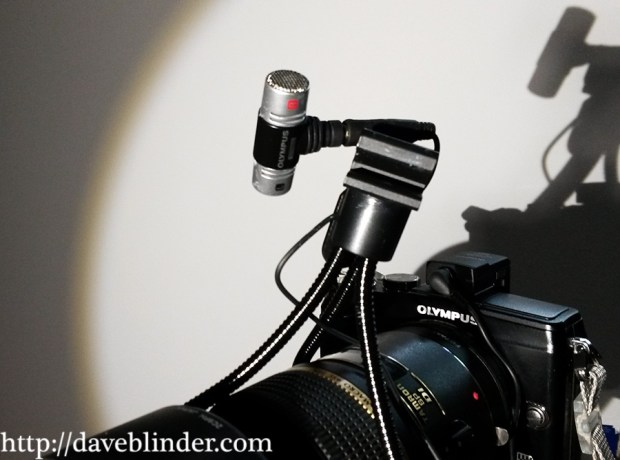
My first test of the Olympus EMA-1 External Mic Adapter + Olympus ME51S Electret Condenser Microphone.  No audio post-processing performed.  Filmed in manual video mode on an Olympus E-PL2 micro four thirds camera through the Tamron SP Di 90mm Macro lens adapted with a Fotasy Canon EOS to m4/3 coupler.


Here’s a view of the Olympus microphone along with the lens and camera I used to for the video and audio recording.


camera, mic, lens

Olympus EMA-1 External Mic Adapter + Olympus ME51S Electret Condenser Microphone. Tamron SP Di 90mm F/2.8 Macro Lens + Olympus PEN E-PL2 micro four thirds camera.

Image Optimization: Before and After

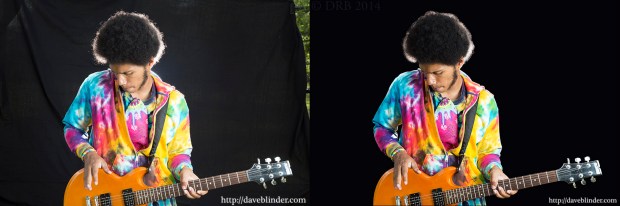
“Get it right in the camera”!  This is a common and sagacious phrase in the photography realm, and one which I abide by.  Typically my nature photos are ready for print or the web within 2 minutes after I’ve imported them from my memory card.  With on-the-scene portraiture there are a lot more variables, so spending a little more time in the “digital darkroom” to polish up the photo is commonplace.  You will note, however, that the exposure on the artist (Rostafa) is identical aside from a contrast tweak.  The foundation for a quality capture here is in quality flashwork and a backdrop of the proper color.
musician

Straight out of camera (RAW file) and finalized output JPEG

My first (and longest) step in post-production was taking the Pen Tool and manually selecting the artist himself.  Carefully creating a path around the subject while viewing the image at 100% magnification for precision.  This is not fun, but absolutely necessary.  Once the path is created by the Pen Tool, I then choose the option “Convert Path to Selection” which makes the subject highlighted.  I then go to the selection menu in PhotoShop and choose “Invert Selection”, which means that my background is completely selected while Rostafa is not.  Now I hit the “bucket tool” and fill in the background with solid black so we have gone from a slightly grayed out backdrop and have the desired black.  This is going to make our subject “pop” more and right away we’ve gone from an amateur-appearing capture to a professional grade image.  We are not done yet though.  I resume looking at the contours of the subject at 100% and will paint or “burn” any edges that look too jagged so that he looks like does indeed belong on this backdrop.

The rest of the workflow is very straightforward.  But if you have any questions, feel free to leave them in the comments and I will answer.

Photography Equipment:

Tamron SP 24-70mm VC F/2.8 lens

Canon EOS 6D

Canon Speedlite 430exII in softbox on camera right for main light.

Canon Speedlite 580ex behind subject for backlight.

Yongnuo YN622 wireless transceivers x 3

Portable backdrop stand.

Artist Contact