Dusk at Sunset Beach

I was doing nature photography in various parts of Cape May this past Thursday, and had a gameplan to head to the well-known Sunset Beach area to try to make some photos of the setting sun.  My plan was foiled as the horizon clouded over as the sun began descending closer and closer to the horizon.
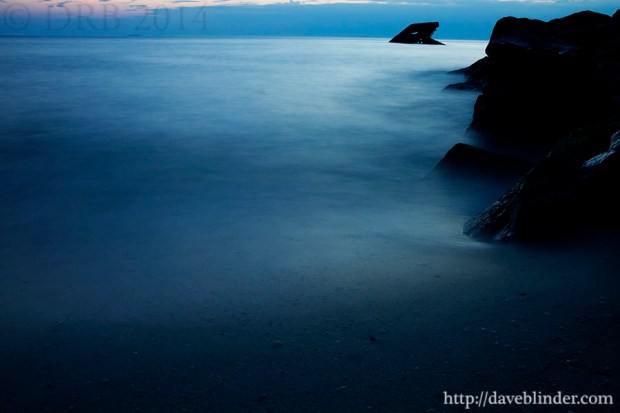
Cape May Dusk

A recent long exposure photo taken in Cape May, New Jersey.

With a fairly bleak sky I shifted my attention and tripod-mounted camera downwards to try to capture the water motion near the tideline.  For this capture, I have a circular 3-stop Neutral Density filter attached to my Tamron 18-270mm VC lens to allow more time for motion within the frame.  The resultant exposure time here was 30 seconds with an aperture of F/13 to have an expansive depth of field.  The ISO value of 100 provides the best image quality possible on current DSLR cameras.

The composition in this image incorporates the rule of thirds to draw the viewer in.  The dark rocks of the jetty occupy roughly 1/3 of the horizontal width of the frame and the sky occupies approximately 1/6 of the vertical height of the frame.  The misty water occupies the vast majority of the scene, but the rocks and the sky give a sense of scale and environment to the scene.

Fingers and Fretboard

A short guitar video (of myself) that I recorded and edited recently in New Jersey.

Manually prefocusing two cameras on the position my guitar would be at was a challenge in itself.  I actually took a cardboard box from a photography light stand and laid it in place as a marker for focusing.  Took me about 3 tries to really guess exactly where my Ibanez guitar would be.  I had external microphones from both cameras wired fairly close to where my small guitar amplifier was on the ground.

After setting the manual video exposures on both cameras, I started rolling and slid myself into position.  Took me about 7 minutes on this take to get a 45 second musical passage that I was happy enough with.

Video post-processing first involved syncing the full 7 minute clips by matching peaks on the audio waveforms.  After that, it was a matter of cutting to whichever video feed I wanted to be viewed for the guitar part being played.  I did some color corrections, highlight tweaks, and selective saturation before rendering out the AVI file.


..

Mic Check

My first test of the Olympus EMA-1 External Mic Adapter + Olympus ME51S Electret Condenser Microphone.  No audio post-processing performed.  Filmed in manual video mode on an Olympus E-PL2 micro four thirds camera through the Tamron SP Di 90mm Macro lens adapted with a Fotasy Canon EOS to m4/3 coupler.


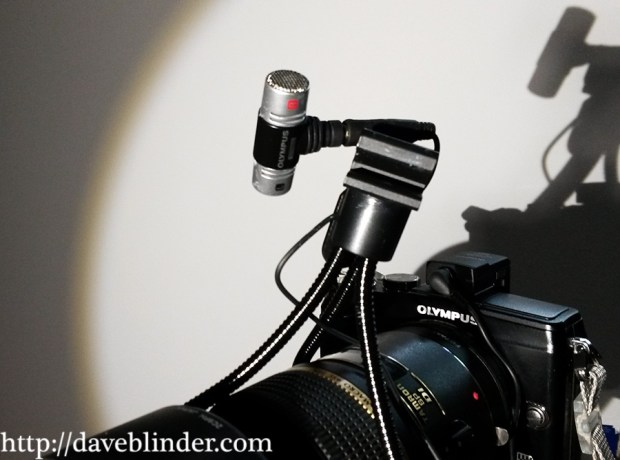
Here’s a view of the Olympus microphone along with the lens and camera I used to for the video and audio recording.


camera, mic, lens

Olympus EMA-1 External Mic Adapter + Olympus ME51S Electret Condenser Microphone. Tamron SP Di 90mm F/2.8 Macro Lens + Olympus PEN E-PL2 micro four thirds camera.

Just another Macro Monday

Sometimes when I head outside to do nature photography, a few nice shots quickly present themselves to me.  Other times, I am outside for hours and the subjects are not cooperating or I just can’t find anything that catches my eye.  3 hours had gone by after lugging around 2 cameras in a local meadow today and it looked like it was time to throw in the towel.  Low and behold, a charismatic insect in a charismatic setting was found while returning to my car.

Ladybug

Asian Lady Beetle atop a white blossom (probably Queen Anne’s Lace).

The above photo was taken with the Tamron SP 90mm VC Macro Lens and a Canon EOS 7D.  It is generally my preference to shoot from a tripod but when your subject is blowing from a breeze I find that a tripod can actually become an obstacle to getting the capture.  The sky had clouded over at this point in the day so I switched the exposure to full manual controls to ensure a proper bright image.  At ISO 400, which I consider my upper threshold for daytime macro shooting, I was still limited to a low shutter speed. 

Choosing a fairly large aperture of F/3.2 allowed more light to hit the camera’s sensor and provided a “dreamy” rendition of the white blossoms.  Composition-wise I thought that executing a vertical photo would create a more dynamic picture and the Beetle is in pretty good compliance with the Rule of Thirds.  I did have to shoot at least a dozen frames with the VC (Vibration Compensation) on.  1/100 of a second is not a very fast shutter speed to freeze a small fragile plant swaying in the breeze and increasing the ISO would degrade the image quality too much for my liking.  Nature photography does take a good deal of tenacity and perseverance in my opinion, but a few sharp shots a day keeps the grumpy Dave’s away.

Image Optimization: Before and After

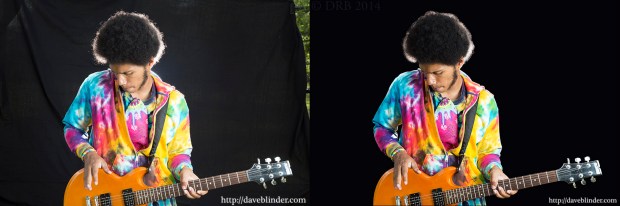
“Get it right in the camera”!  This is a common and sagacious phrase in the photography realm, and one which I abide by.  Typically my nature photos are ready for print or the web within 2 minutes after I’ve imported them from my memory card.  With on-the-scene portraiture there are a lot more variables, so spending a little more time in the “digital darkroom” to polish up the photo is commonplace.  You will note, however, that the exposure on the artist (Rostafa) is identical aside from a contrast tweak.  The foundation for a quality capture here is in quality flashwork and a backdrop of the proper color.

musician

Straight out of camera (RAW file) and finalized output JPEG

My first (and longest) step in post-production was taking the Pen Tool and manually selecting the artist himself.  Carefully creating a path around the subject while viewing the image at 100% magnification for precision.  This is not fun, but absolutely necessary.  Once the path is created by the Pen Tool, I then choose the option “Convert Path to Selection” which makes the subject highlighted.  I then go to the selection menu in PhotoShop and choose “Invert Selection”, which means that my background is completely selected while Rostafa is not.  Now I hit the “bucket tool” and fill in the background with solid black so we have gone from a slightly grayed out backdrop and have the desired black.  This is going to make our subject “pop” more and right away we’ve gone from an amateur-appearing capture to a professional grade image.  We are not done yet though.  I resume looking at the contours of the subject at 100% and will paint or “burn” any edges that look too jagged so that he looks like does indeed belong on this backdrop.

The rest of the workflow is very straightforward.  But if you have any questions, feel free to leave them in the comments and I will answer.

Photography Equipment:

Tamron SP 24-70mm VC F/2.8 lens

Canon EOS 6D

Canon Speedlite 430exII in softbox on camera right for main light.

Canon Speedlite 580ex behind subject for backlight.

Yongnuo YN622 wireless transceivers x 3

Portable backdrop stand.

Artist Contact